# 【Tutorial 15】#Marketplace# Collect, Trade, Unlock the Power of the Marketplace

<figure><img src="https://miro.medium.com/v2/resize:fit:1050/0*HM-PZCr2m7LGnYgw" alt="" height="394" width="700"><figcaption></figcaption></figure>

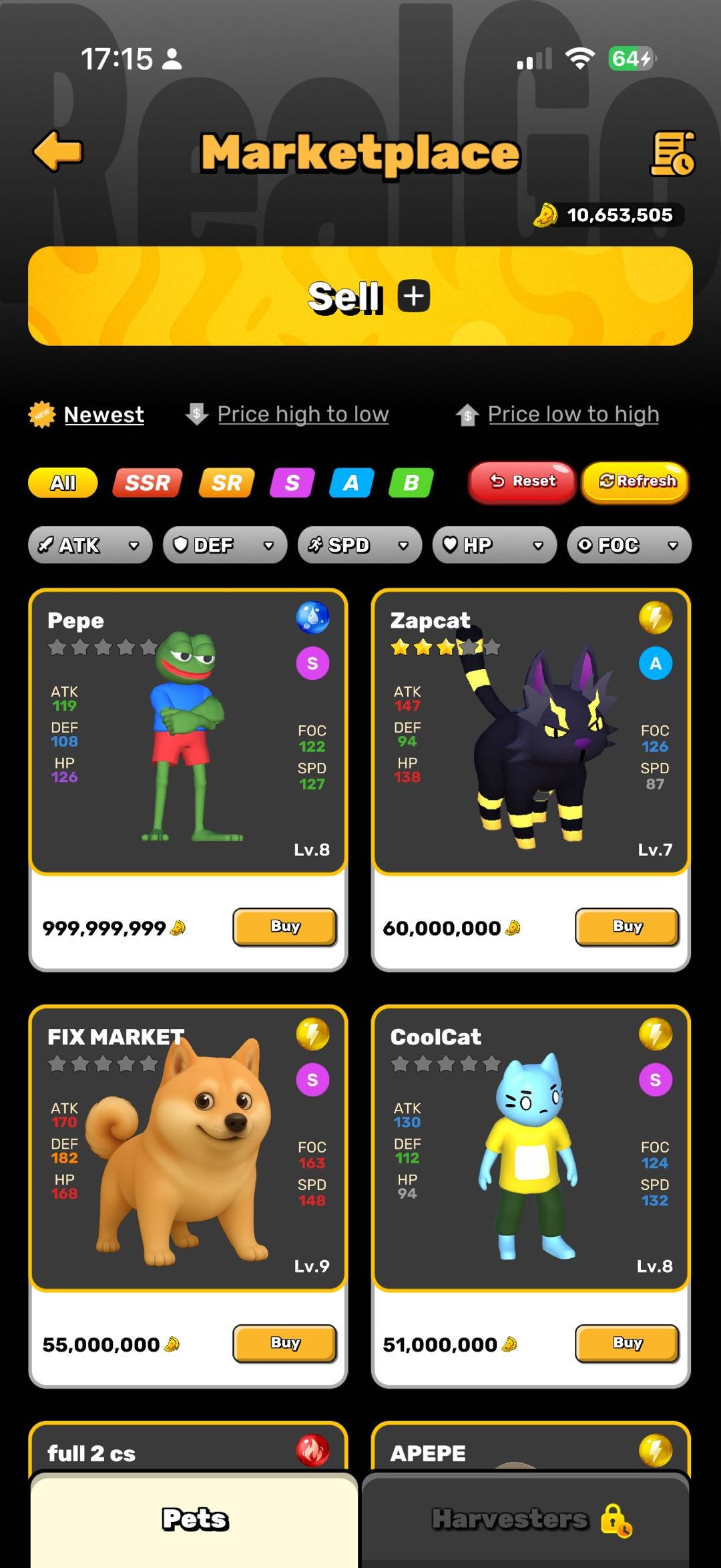
In the world of **RealGo**, your pets and items are more than just battle companions — they can also be freely traded in the **Marketplace**. This is the core hub where players buy and sell pets to each other. Whether you’re aiming to **earn $RT** or find the perfect **Meme Pet**, the Marketplace is where it all happens.

Here’s a step-by-step guide to help you get started!

### 1️⃣ How to Enter the Marketplace <a href="#id-7491" id="id-7491"></a>

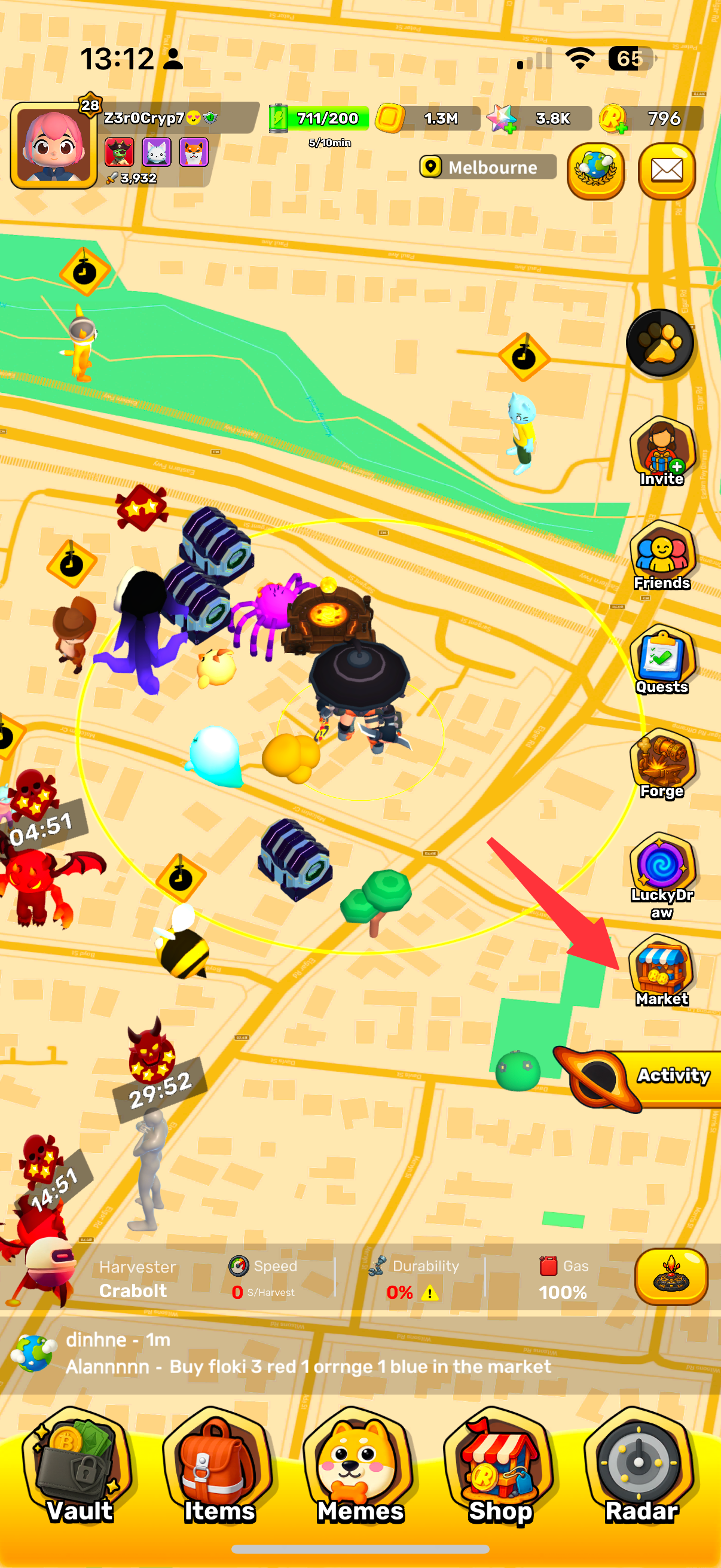
* From the game’s home screen, tap the **“Market”** button to enter the marketplace.
* Here, you’ll see all the pets and items listed by other players, and you can also put your own assets up for sale.

<div><figure><img src="https://miro.medium.com/v2/resize:fit:1809/1*_KObVQnH6N_PJkv7tzXU1w.png" alt="" width="375"><figcaption></figcaption></figure> <figure><img src="https://miro.medium.com/v2/resize:fit:1620/1*iAix21RV_0YYMxQBtoJw9A.jpeg" alt="" width="375"><figcaption></figcaption></figure></div>

### 2️⃣ How to Sell Pets or Items <a href="#id-2a84" id="id-2a84"></a>

1. Enter the Market and tap **“Sell.”**

2\. Choose what you want to sell: **Pet**&#x20;

3\. Set your price.

<div><figure><img src="/files/BnKSw0IZhHJJvUQaUjPP" alt="" width="375"><figcaption></figcaption></figure> <figure><img src="/files/vX5djWlcSv6fb0Mjyu6s" alt="" width="375"><figcaption></figcaption></figure> <figure><img src="/files/LG0ZewHiBJ5tKMLf7YGH" alt="" width="375"><figcaption></figcaption></figure></div>

Take down your pet or item from the listing

<div><figure><img src="/files/KjlxdnuN3zKcceiaxwT3" alt="" width="375"><figcaption></figcaption></figure> <figure><img src="/files/11LS95Dxng9klWtmycXL" alt="" width="375"><figcaption></figcaption></figure> <figure><img src="/files/dQPVZK41bJBRhJrKHZhZ" alt="" width="375"><figcaption></figcaption></figure></div>

### 3️⃣ How to Buy Pets  <a href="#id-789a" id="id-789a"></a>

<div><figure><img src="/files/j0g9OQ33YFHNHpltIw3j" alt="" width="375"><figcaption></figcaption></figure> <figure><img src="/files/jX5ASRMD2NU2Z2mtkeWE" alt="" width="375"><figcaption></figcaption></figure></div>

### 🎯 Summary <a href="#e5eb" id="e5eb"></a>

The Marketplace is a key part of RealGo’s economy, where players truly **own, trade, and profit from their in-game assets.** Whether you’re looking to sell rare pets for $RT or expand your collection, the Marketplace is the place to make it happen.
---

# Agent Instructions: Querying This Documentation

If you need additional information that is not directly available in this page, you can query the documentation dynamically by asking a question.

Perform an HTTP GET request on the current page URL with the `ask` query parameter:

```
GET https://realgo.gitbook.io/whitepaper/beginners-guide/tutorial-15-marketplace-collect-trade-unlock-the-power-of-the-marketplace.md?ask=<question>
```

The question should be specific, self-contained, and written in natural language.
The response will contain a direct answer to the question and relevant excerpts and sources from the documentation.

Use this mechanism when the answer is not explicitly present in the current page, you need clarification or additional context, or you want to retrieve related documentation sections.
