# 【Tutorial 25】#Brand New Meme-Themed Group Chats\#

### Everything You Need to Know About the New Chat System in RealGo <a href="#add7" id="add7"></a>

<figure><img src="https://miro.medium.com/v2/resize:fit:1050/0*xH1dVyLvlbW0gGwz" alt="" height="394" width="700"><figcaption></figcaption></figure>

RealGo’s brand-new **Meme-Themed Group Chats** turn conversation into gameplay. By staying active in chats, gifting pets, sharing marketplace listings, and teaming up for Core Field mining, players can socialise, earn rewards, and bring memes to life together. This is where chatting becomes rewarding, communities grow naturally, and memes gain real utility through interaction and play.

**Capture, collect, battle, socialise, and earn** — all in one place.\
At RealGo, we’re building living meme communities with real applications and real value for our players.

### 1. Group Chat <a href="#id-805f" id="id-805f"></a>

On the home screen, tap **“Join”** to enter the brand-new group chat.

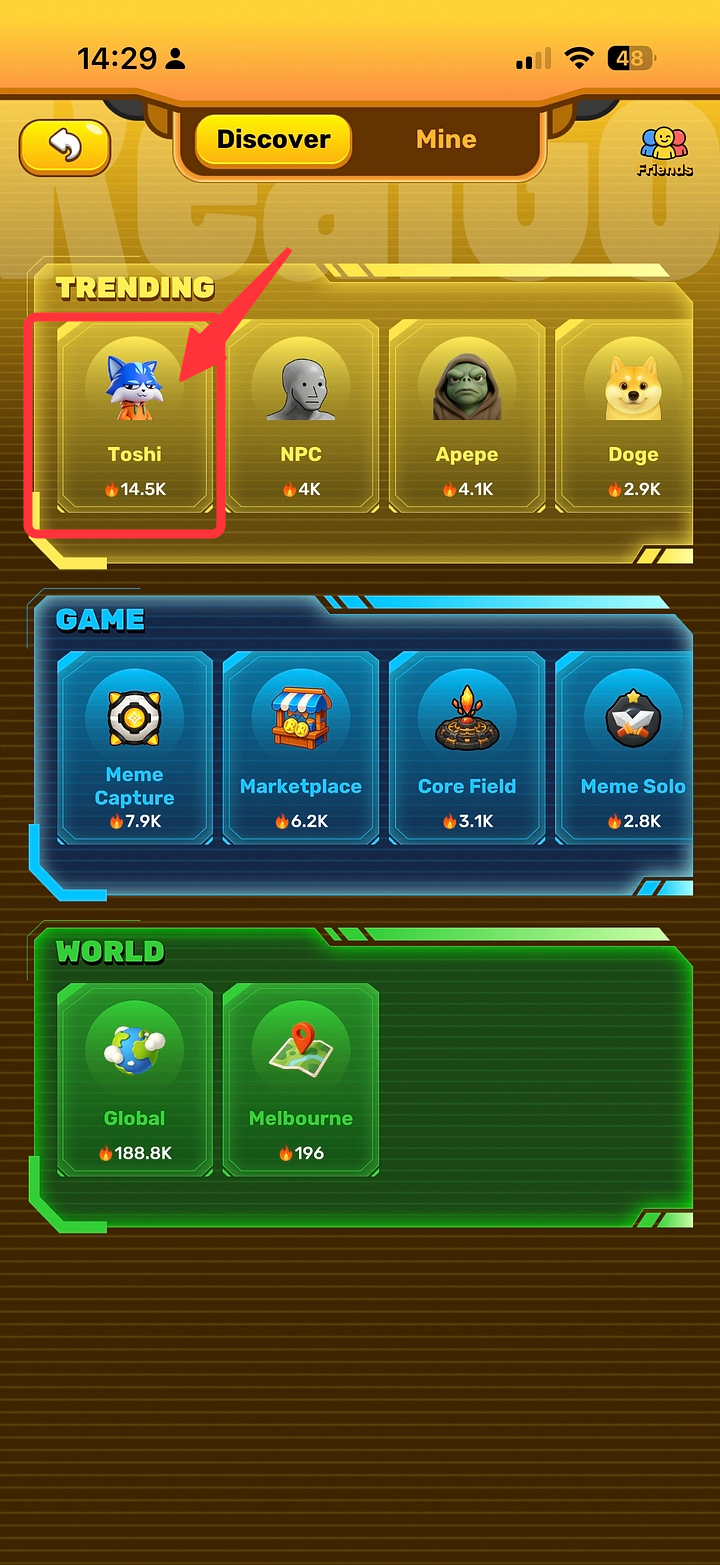
#### 1.1 Discover Page <a href="#id-148c" id="id-148c"></a>

* Browse different **meme-themed** or **game-themed** group chats.
* Discover communities based on interests, events, or Meme IPs.

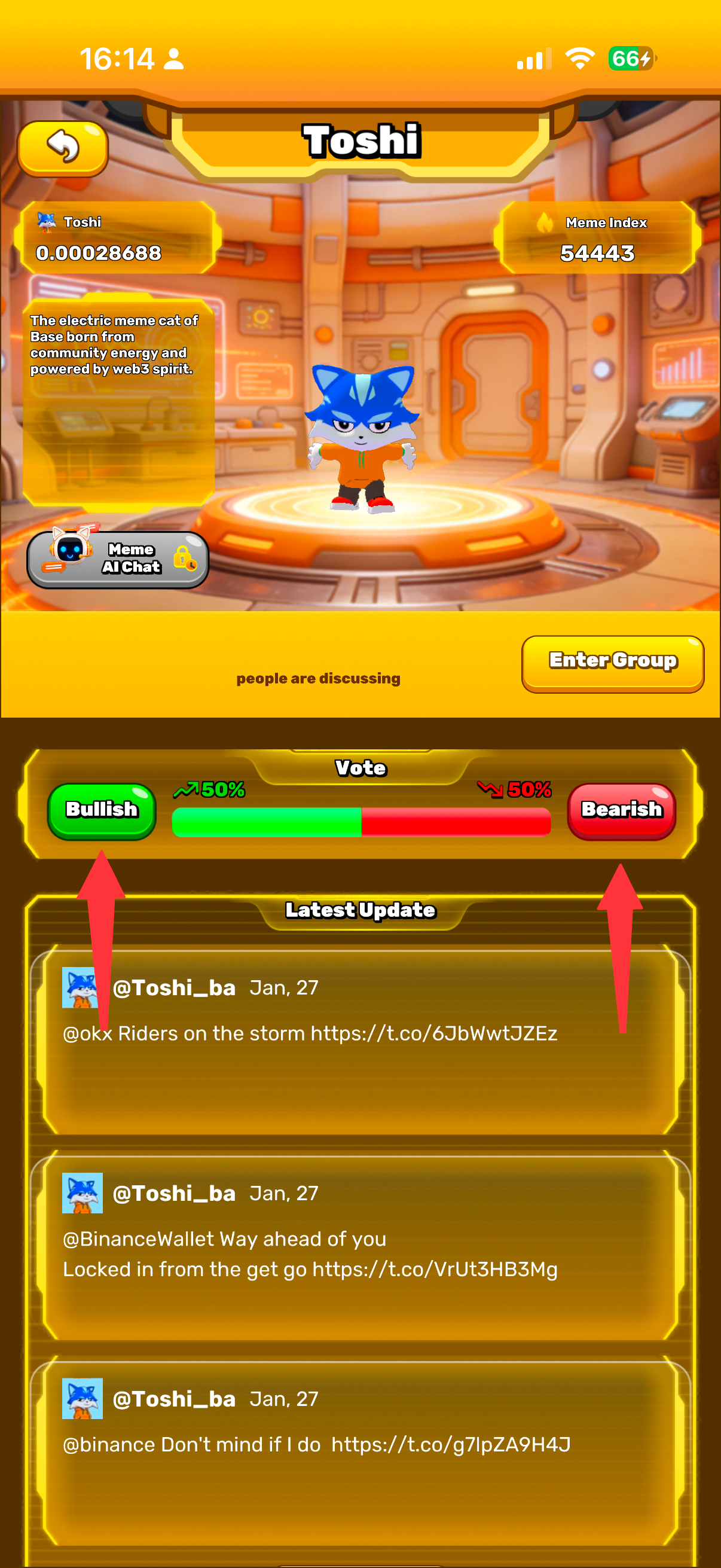
#### 1.2 MEME OnePage <a href="#id-5e4d" id="id-5e4d"></a>

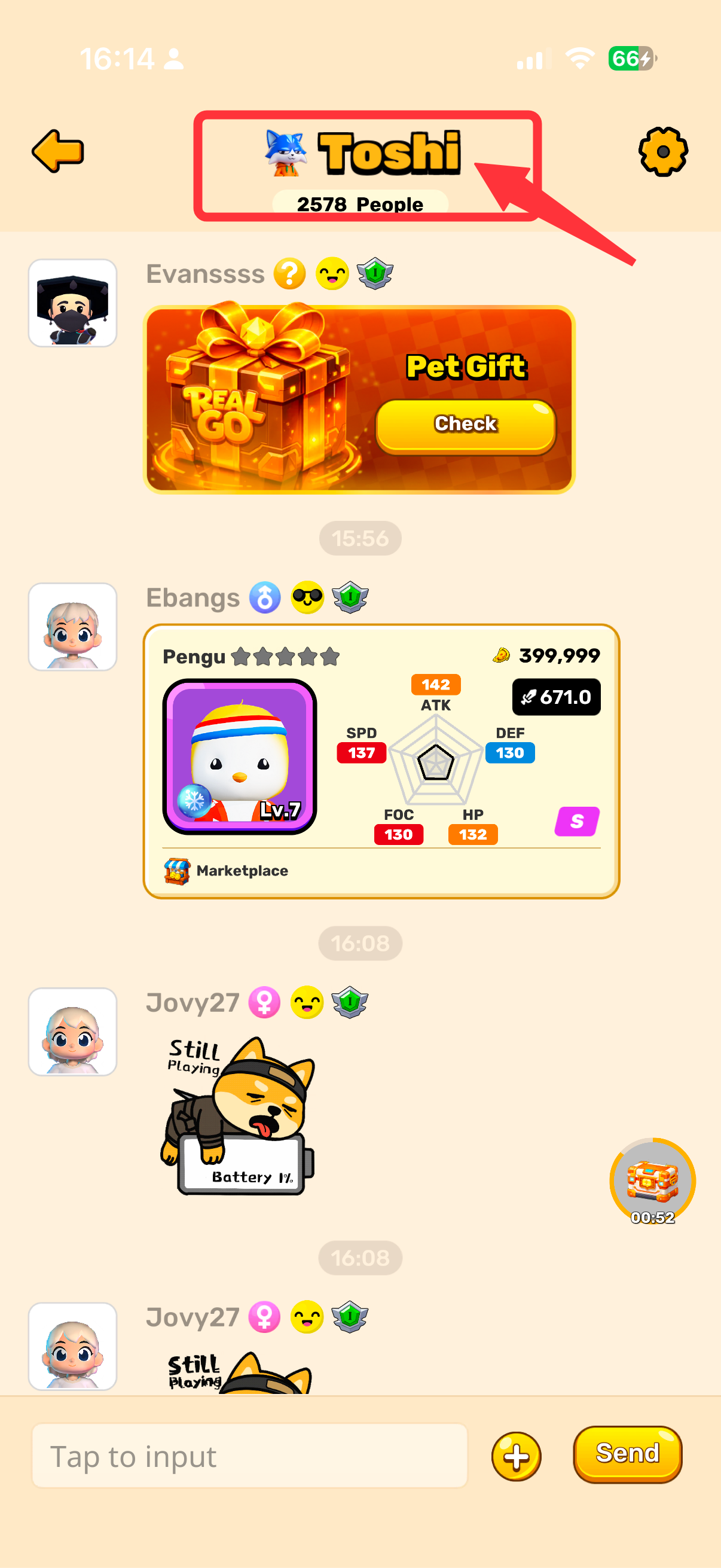
Every meme now has its own dedicated wiki style profile page.

<div><figure><img src="https://miro.medium.com/v2/resize:fit:1080/1*5b7S_DdR-89rUyhryimA2g.png" alt="" width="375"><figcaption></figcaption></figure> <figure><img src="https://miro.medium.com/v2/resize:fit:1809/1*qL265CdfH1aqCqQDjELfhA.png" alt="" width="375"><figcaption></figcaption></figure> <figure><img src="https://miro.medium.com/v2/resize:fit:1809/1*ftXesdmVXv71uq1mlLj6Sw.png" alt="" width="375"><figcaption></figcaption></figure></div>

#### 1.3 Mine Page <a href="#id-9260" id="id-9260"></a>

* Displays all **group chats you have joined**.
* Shows your **private chat list**, sorted by most recent conversations.
* Quickly enter any joined community or private conversation from here.

<div><figure><img src="https://miro.medium.com/v2/resize:fit:1809/0*CfMF7dB4D8sw4MDd" alt="" width="375"><figcaption></figcaption></figure> <figure><img src="https://miro.medium.com/v2/resize:fit:1809/0*DxnpXm6VRkALmBq_" alt="" width="375"><figcaption></figcaption></figure> <figure><img src="https://miro.medium.com/v2/resize:fit:1809/0*wTkgXEnhPLxhAWEo" alt="" width="375"><figcaption></figcaption></figure></div>

### 2. Friend System <a href="#id-9d55" id="id-9d55"></a>

#### 2.1 Friend List <a href="#id-45c3" id="id-45c3"></a>

* View your complete list of friends.

<div><figure><img src="https://miro.medium.com/v2/resize:fit:1809/0*tS7rqr0I7F3g6bGc" alt="" width="375"><figcaption></figcaption></figure> <figure><img src="https://miro.medium.com/v2/resize:fit:1809/0*CLM5-YCCfRhP4EGH" alt="" width="375"><figcaption></figcaption></figure></div>

#### 2.2 Interacting with a Friend <a href="#f80d" id="f80d"></a>

Tap on a friend to:

* View their **profile** card
* Start a private C**hat**
* Send a **Gift Pet**

<div><figure><img src="https://miro.medium.com/v2/resize:fit:1809/0*LFmc5rn6fvScwtK_" alt="" width="375"><figcaption></figcaption></figure> <figure><img src="https://miro.medium.com/v2/resize:fit:1809/0*HQMOy09EyQCqL0AC" alt="" width="375"><figcaption></figcaption></figure></div>

#### 2.3 Private Chat <a href="#aa45" id="aa45"></a>

In private chats, you can:

* Send text messages
* Use stickers and emojis
* Send a **Gift Pet**

#### Gift Pet Rules <a href="#id-9e83" id="id-9e83"></a>

* Only **pets** can be sent as gifts
* Can be sent in **group chats or private chats**
* Gifts not claimed within **24 hours** are automatically returned
* Unclaimed gifts trigger an **in-game mail notification**

<div><figure><img src="https://miro.medium.com/v2/resize:fit:1809/0*CfSeCMy0Z-gOpZp-" alt="" width="375"><figcaption></figcaption></figure> <figure><img src="https://miro.medium.com/v2/resize:fit:1809/0*G8RcoAwpO-E9pa3m" alt="" width="375"><figcaption></figcaption></figure></div>

#### 2.4 Sharing Marketplace Listings <a href="#d94d" id="d94d"></a>

Players can share pets they have listed on the **Marketplace** directly into chats.

<div><figure><img src="https://miro.medium.com/v2/resize:fit:1809/0*YW4PtVEiheMyKLG4" alt="" width="375"><figcaption></figcaption></figure> <figure><img src="https://miro.medium.com/v2/resize:fit:1809/0*9nrcNY2rJzuCwumt" alt="" width="375"><figcaption></figcaption></figure> <figure><img src="https://miro.medium.com/v2/resize:fit:1809/0*bFpyoBNqVNtWM1Sz" alt="" width="375"><figcaption></figcaption></figure> <figure><img src="https://miro.medium.com/v2/resize:fit:1809/0*Ruql3m5S8StHwgiI" alt="" width="375"><figcaption></figcaption></figure></div>

<div><figure><img src="https://miro.medium.com/v2/resize:fit:1809/0*_vs-juDFsKXcUKpw" alt="" width="375"><figcaption></figcaption></figure> <figure><img src="https://miro.medium.com/v2/resize:fit:1809/0*4EE6ZYJ0MIxIu3Rf" alt="" width="375"><figcaption></figcaption></figure></div>

Other players can tap the shared card in the group chat and **purchase the pet instantly**.

<div><figure><img src="https://miro.medium.com/v2/resize:fit:1809/0*p74CwbOTFyTnIya6" alt="" width="375"><figcaption></figcaption></figure> <figure><img src="https://miro.medium.com/v2/resize:fit:1809/0*vbKP4Mp04-jxXVlY" alt="" width="375"><figcaption></figcaption></figure></div>

#### 2.5 Sharing Mining Information <a href="#id-3bf9" id="id-3bf9"></a>

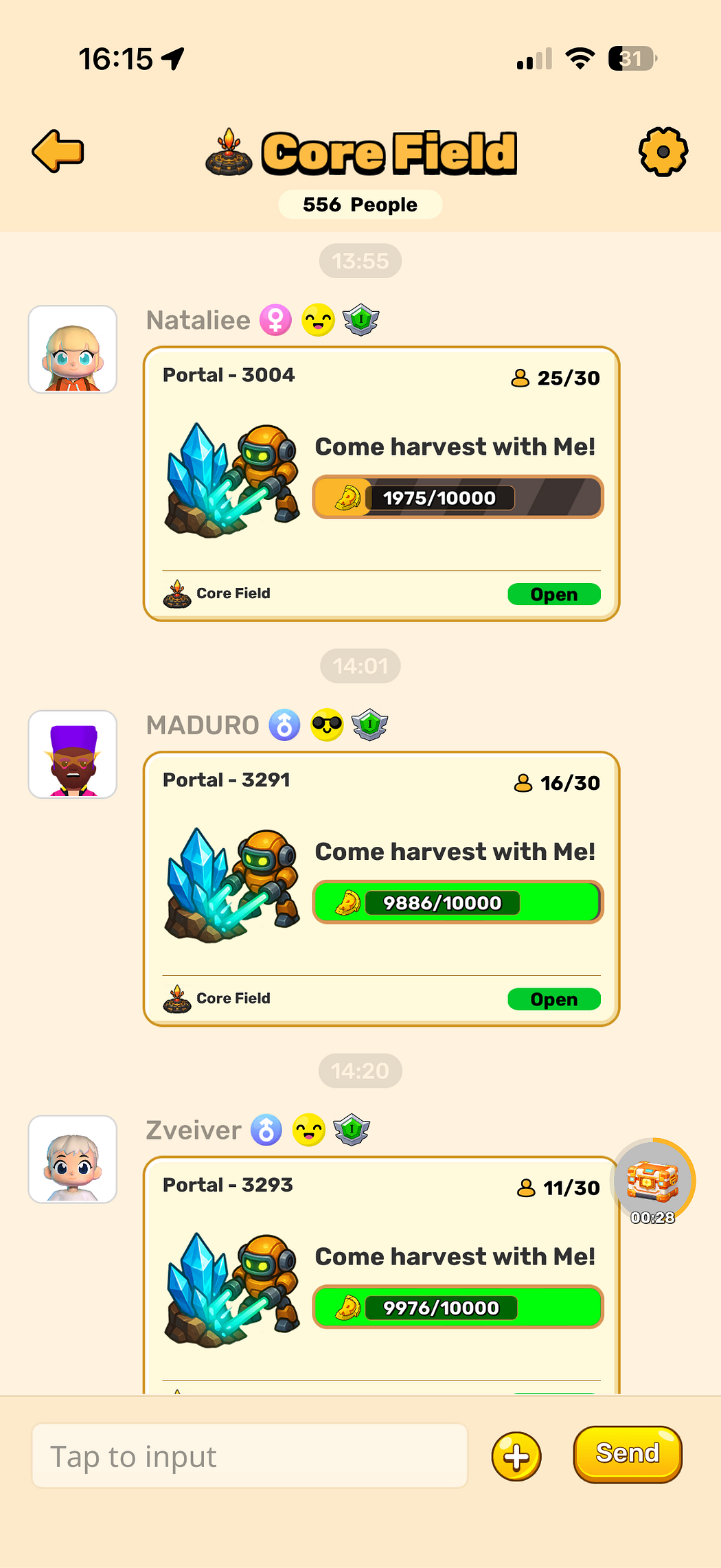
Players can share **mining-related information and invitations** directly into chats.

<div><figure><img src="https://miro.medium.com/v2/resize:fit:1809/0*-03LwYDrRFE9foLc" alt="" width="375"><figcaption></figcaption></figure> <figure><img src="https://miro.medium.com/v2/resize:fit:1809/0*DgHp1JBpfnFjV4fb" alt="" width="375"><figcaption></figcaption></figure> <figure><img src="https://miro.medium.com/v2/resize:fit:1809/0*hwePBgBFHeBdmi9B" alt="" width="375"><figcaption></figcaption></figure> <figure><img src="https://miro.medium.com/v2/resize:fit:1809/0*0lyB1iEJ-41qTDcf" alt="" width="375"><figcaption></figcaption></figure></div>

Other players can view mining information shared in group chats and join the mining activity together.

<figure><img src="https://miro.medium.com/v2/resize:fit:1050/1*z9fRYGJCJyVZ6BkdV9XkgA.png" alt="" width="375"><figcaption></figcaption></figure>

### 3. View Group Members <a href="#id-6018" id="id-6018"></a>

* Tap the **settings icon** in the top-right corner of a group chat.
* Select **“Show Group Members”** to view all members.
* You can add other players as friends directly from this list.
* You can also chat with other players without adding them as friends.
* Each non-friend can receive up to **10 messages per day**

<div><figure><img src="https://miro.medium.com/v2/resize:fit:1809/0*tVewpNgvOOkzcBtz" alt="" width="375"><figcaption></figcaption></figure> <figure><img src="https://miro.medium.com/v2/resize:fit:1809/0*RoRYcnbWsArYPDrB" alt="" width="375"><figcaption></figcaption></figure> <figure><img src="https://miro.medium.com/v2/resize:fit:1809/0*6WopVNfUYwfVwbmF" alt="" width="375"><figcaption></figcaption></figure></div>

### 4. Content in Group Chats <a href="#bca9" id="bca9"></a>

Players can send:

* Stickers & emojis
* Gift Pet
* Marketplace cards (sent directly from the marketplace)
* Mining team invitation cards (sent directly from the Core Field)

### 5. Messaging Limits for Non-Friends <a href="#id-7252" id="id-7252"></a>

To prevent spam and harassment:

* You can message up to **5 non-friends per day**
* Each non-friend can receive up to **10 messages per day**

#### Allowed Content for Non-Friend Chats <a href="#id-8e7b" id="id-8e7b"></a>

* Plain text
* Stickers & emojis
* Gift Pet

<div><figure><img src="https://miro.medium.com/v2/resize:fit:1809/0*aQBC_E4CVYqHThZx" alt="" width="375"><figcaption></figcaption></figure> <figure><img src="https://miro.medium.com/v2/resize:fit:1809/0*y1u9XLwcduIGXq3J" alt="" width="375"><figcaption></figcaption></figure></div>

### 6. Chat-to-Earn Feature <a href="#c72d" id="c72d"></a>

#### How It Works <a href="#id-8d97" id="id-8d97"></a>

* Enter a chat page and perform any action (e.g. send a message or tap the countdown button).
* Stay on the page for **60 seconds**.
* Once the countdown finishes, rewards are credited automatically and can be checked in your wallet.

#### Important Notes <a href="#id-6556" id="id-6556"></a>

* After entering the chat page, the countdown starts **only after the first user action**.
* Once a countdown ends, you must perform **another in-page action** to trigger the next countdown.
* No actions = no countdown.

<div><figure><img src="https://miro.medium.com/v2/resize:fit:1809/0*oQpa5LNsnKl1BwkQ" alt="" width="375"><figcaption></figcaption></figure> <figure><img src="https://miro.medium.com/v2/resize:fit:1620/0*t9r-ppBjaBH6t05z" alt="" width="375"><figcaption></figcaption></figure> <figure><img src="https://miro.medium.com/v2/resize:fit:1809/0*YyGJn0op-wZ9DMZF" alt="" width="375"><figcaption></figcaption></figure></div>

<div><figure><img src="https://miro.medium.com/v2/resize:fit:1809/0*8xBLOvinXlabeEEt" alt="" width="375"><figcaption></figcaption></figure> <figure><img src="https://miro.medium.com/v2/resize:fit:1809/0*5HWvGezFr7KEhoK1" alt="" width="375"><figcaption></figcaption></figure></div>

### 7. Muted Players <a href="#dc6b" id="dc6b"></a>

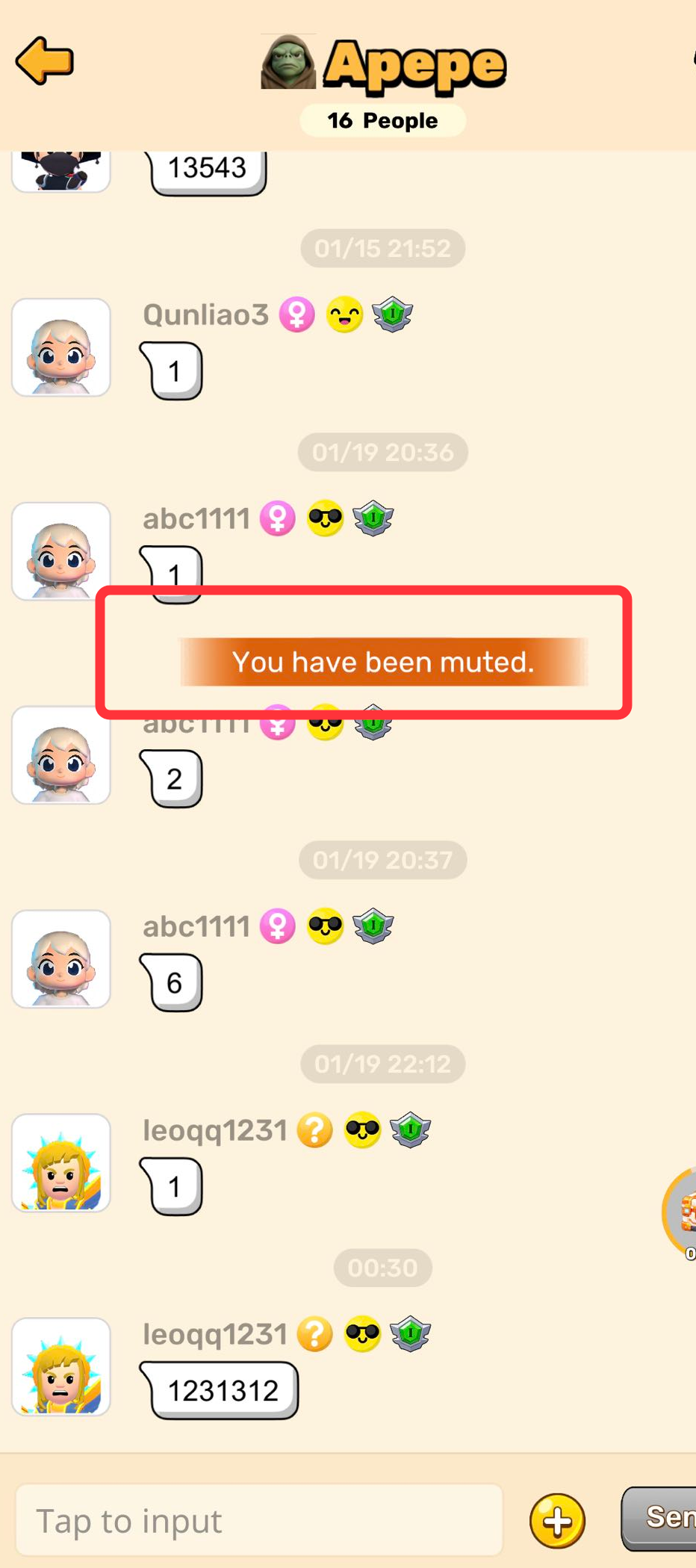
* Players who post inappropriate or non-compliant content may be **muted by administrators**.
* Muted players will:
* See a toast notification saying **“You’ve been muted.”** when attempting to send messages
* Receive an **in-game mail notification**
* Muting remains in effect until the restriction is lifted.

<figure><img src="https://miro.medium.com/v2/resize:fit:1050/1*4sM9az3ZX2H00iKe353AmA.png" alt="" width="375"><figcaption></figcaption></figure>

Keep those feedback coming Defenders! Team RealGo sincerely appreciates your support and you can count on us to continue improving the game to further enhance your RealGo gaming experience!
---

# Agent Instructions: Querying This Documentation

If you need additional information that is not directly available in this page, you can query the documentation dynamically by asking a question.

Perform an HTTP GET request on the current page URL with the `ask` query parameter:

```
GET https://realgo.gitbook.io/whitepaper/beginners-guide/tutorial-25-brand-new-meme-themed-group-chats.md?ask=<question>
```

The question should be specific, self-contained, and written in natural language.
The response will contain a direct answer to the question and relevant excerpts and sources from the documentation.

Use this mechanism when the answer is not explicitly present in the current page, you need clarification or additional context, or you want to retrieve related documentation sections.