> For the complete documentation index, see [llms.txt](https://realgo.gitbook.io/whitepaper/llms.txt). Markdown versions of documentation pages are available by appending `.md` to page URLs; this page is available as [Markdown](https://realgo.gitbook.io/whitepaper/beginners-guide/tutorial-28-meme-arena-how-to-battle-build-your-squad-and-climb-the-leaderboards.md).
# 【Tutorial 28】#Meme Arena# How to Battle, Build Your Squad, and Climb the Leaderboards
> **Meme Arena is now live!**
>
> This guide will walk you through everything you need to know to get started, including how to access the arena, play different battle modes, build your squad, track your stats, and check the leaderboards.
>
> Whether you are a new defender entering the arena for the first time or a veteran looking to sharpen your strategy, this tutorial covers all the essentials to help you dive into the action.
Quick Start
1. Enter Meme Arena
2. Choose your stake
3. Build your squad
4. Win battles and earn rewards
### How to Access Meme Arena
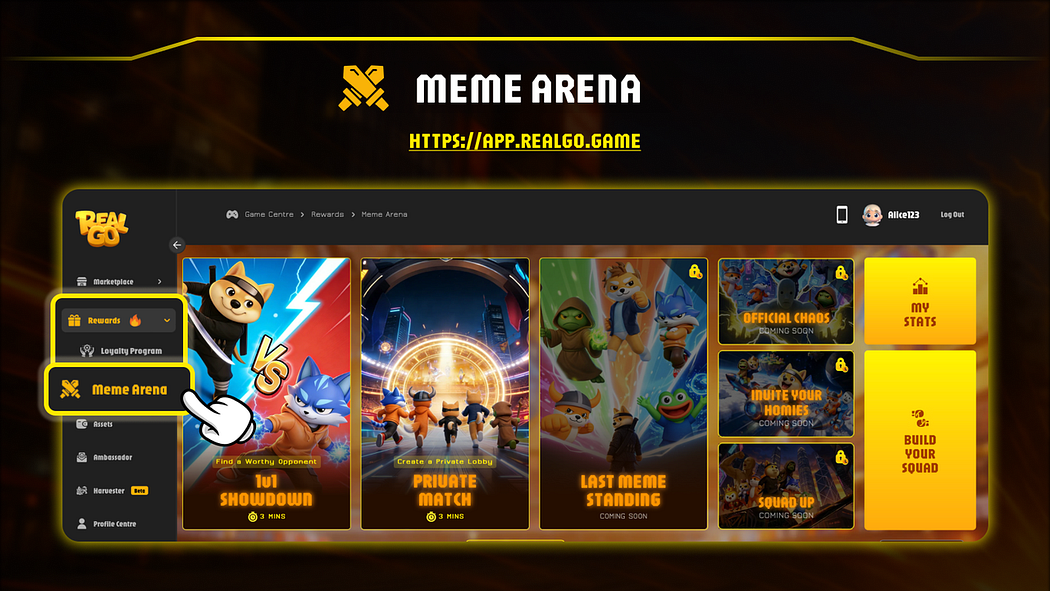
Step 1: Visit the RealGo DApp
Go to: [https://app.realgo.game](https://app.realgo.game/)
Step 2: Navigate to Meme Arena
On the left navigation panel, open the **Rewards** dropdown menu, then select **Meme Arena** to enter the game lobby.
### Meme Arena Game Modes
Meme Arena currently features two battle modes:
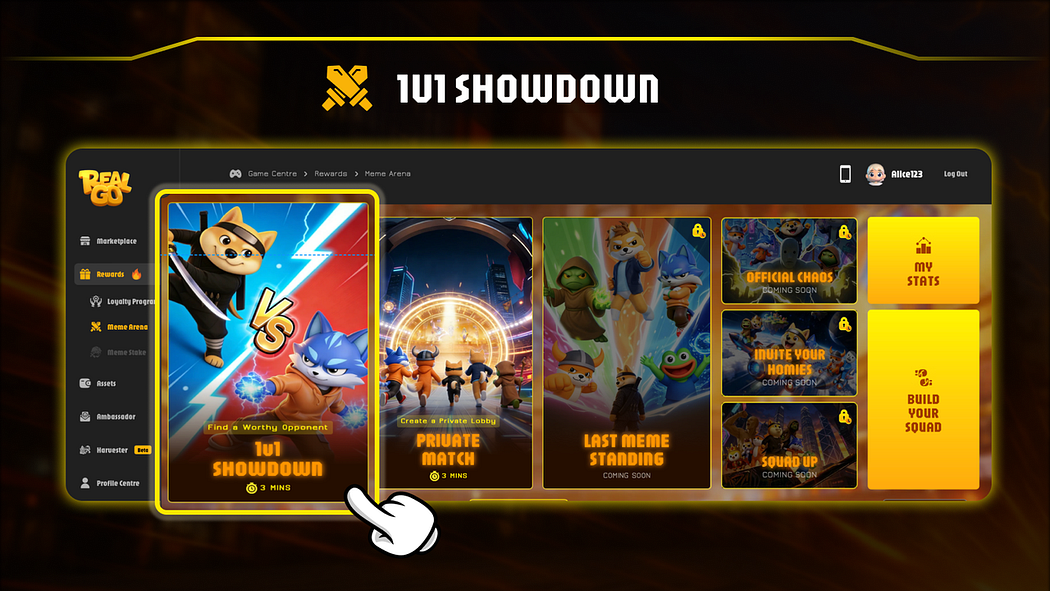
* **1v1 Showdown**
* **Private Match**
Each mode offers a different way for defenders to compete and test their squads.
In **1v1 Showdown**, players are automatically matched with other defenders who enter the same stake tier, creating a fast and competitive battle experience.
In **Private Match**, players can create a room or join using a room code, allowing them to challenge friends or organize custom battles.
Additional battle modes are currently under development and will be released soon.
### Battle Mode Guide
### 1v1 Showdown
#### Step 1: Select Your Stake
Before entering the arena, choose your **entry stake tier**.
Available tiers:
* 1,000 RT Shards
* 5,000 RT Shards
* 10,000 RT Shards
Multi-select supported:
* You can select multiple stake tiers at the same time
* The system may match you into any of the selected tiers
Tip: Selecting more tiers can help reduce matchmaking time
#### Step 2: Build Your Squad
Next, assemble your battle lineup.
Select **3 memes** from your meme pool to form your squad.
You can tap each meme to view its details before confirming your lineup.
Squad requirements:
* Minimum rarity: **S**
* Maximum squad size: **3 memes**
* Pets must be level 7 or above to enter Meme Arena.
Your squad selection and meme order will influence the battle outcome.
#### Pet Death Risk Notice
During battles, memes that are knocked out have a **small chance of permanent death**.
Death probability depends on rarity:
* **S** — Low chance
* **SR** — Very low chance
* **SSR** — Extremely low chance
Deploy your squad wisely and consider the risks before entering combat.
#### Step 3: Battle & Rewards
Battles are resolved in **a single match**, following the preset order of memes in your squad.
Once the battle ends, rewards are automatically distributed.
Settlement Rules:
* **Winner receives:** 90% of the total stake pool
* **Platform fee:** 10%
Victory goes to the defender with the strongest squad strategy.
### Private **Match**
#### Step 1: Create or Join a Room
Private Room Mode allows players to battle **specific opponents** instead of using automatic matchmaking.
You can either:
* **Create a room** and share the room code with your opponent
* **Join a room** by entering an existing room code
This mode is ideal for challenging friends or organizing custom battles.
#### Step 2: Select Your Stake
Choose the stake tier for the match.
Available tiers:
* 10,000 RT Shards
* 50,000 RT Shards
* 100,000 RT Shards
The player who creates the room sets the stake amount, and the player who join will automatically stake the same amount.
#### Step 3: Build Your Squad
Select **3 memes** from your meme pool to form your squad.
Tap each meme to review its attributes before adding it to your lineup.
Squad requirements:
* Minimum rarity: **S**
* Maximum squad size: **3 memes**
* Pets must be **level 7 or above** to enter Meme Arena.
Your strategy and meme order will determine the outcome of the match.
#### Pet Death Risk Notice
During battles, memes that are knocked out may face a **small chance of permanent death**.
Death probability depends on rarity:
* **S** — Low chance
* **SR** — Very low chance
* **SSR** — Extremely low chance
Choose your squad wisely before entering the battle.
#### Step 4: Battle & Rewards
Once both players are ready, the battle will begin.
Battles are resolved in **a single match**, following the preset meme order.
Settlement Rules:
* **Winner receives:** 90% of the total stake pool
* **Platform fee:** 10%
The defender with the stronger squad strategy claims victory.
### Last MEME Standing
#### **Step 1: Select Your Stake**
Available tiers:
* 1,000 RT Shards
* 5,000 RT Shards
* 10,000 RT Shards
Multi-select supported:
* You can select multiple stake tiers at the same time
* The system may match you into any of the selected tiers
Tip: Selecting more tiers can help reduce matchmaking time
#### **Step 2: Build Your Squad**
Select 3 memes from your meme pool
Squad requirements:
* Minimum rarity: S
* Maximum squad size: 3
* Pets must be level 7 or above
The order of your pets will affect the battle outcome
**Pet Death Risk Notice**
Pets defeated in battle have a small chance of permanent death
Death probability by rarity:
* S: Low
* SR: Very low
* SSR: Extremely low
#### **Step 3:**
The match will start once 5 players have selected the same stake, and the final match stake will be based on the common selection.
For example:
* Player 1 selects: 1000 / 5000 / 10000
* Player 2 selects: 5000 / 10000
* Player 3 selects: 10000
* Player 4 selects: 1000 / 10000
* Player 5 selects: 10000
In this case, all 5 players have selected **10000**, so the match will be created with a stake of **10000.**
#### **Step 4:** Reward Distribution Rules
In Meme Arena, rewards are distributed based on the number of players in each match.\
A total of **90% of the reward pool is allocated to ranked players**, while **10% is taken as a platform fee**.\
Players outside the rewarded ranks will not receive any rewards.
Here’s how rewards are distributed under different player counts:
* **5 Players**\
Top 4 players receive rewards:\
**1st: 55% | 2nd: 20% | 3rd: 10% | 4th: 5%**\
5th place receives no rewards.
**Example:**\
Assume there are 5 players in the match, and each player stakes **1000 RT Shards**.\
The total reward pool is:
**1000 × 5 = 5000 RT Shards**
The rewards are distributed as follows:
* **1st place: 5000 × 55% = 2750 RT Shards**
* **2nd place: 5000 × 20% = 1000 RT Shards**
* **3rd place: 5000 × 10% = 500 RT Shards**
* **4th place: 5000 × 5% = 250 RT Shards**
* **5th place: 0**
* **3–4 Players**\
Only the top 3 players receive rewards:\
**1st: 60% | 2nd: 20% | 3rd: 10%**\
(In a 4-player match, 4th place receives no rewards.)
* **2 Players**\
Rewards are distributed as:\
**1st: 70% | 2nd: 20%**\
(The original 10% for 3rd place is added to the winner.)
* **1 Player**\
No rewards will be distributed.\
Matches with insufficient players will not generate a reward pool.
**Note:**
The “3-player / 4-player / 2-player match” scenarios refer to the number of **active players at the time of settlement**, which typically occurs when some players disconnect during matchmaking.
If a match initially starts with **5 players**, but some players disconnect during matchmaking, leaving only 2–4 players at settlement, the rewards will be distributed based on the corresponding player count.
Please note:
If players are not disconnected but are defeated during the match (normal elimination), they are still considered participants. In this case, rewards will still be distributed according to the **5-player match rules**.
####
### Battle Controls
#### Movement
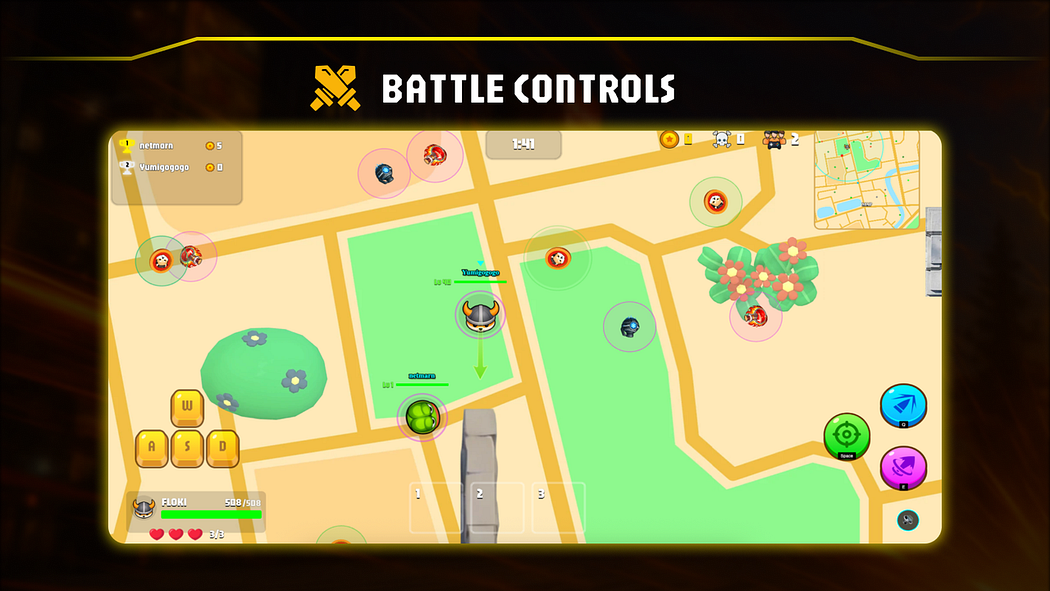
When playing on desktop, use the keyboard to control movement:
* **W** — Move up
* **A** — Move left
* **S** — Move down
* **D** — Move right
#### Combat Actions
* **Space** — Basic Attack
* **Q** — Medium Attack
* **E** — Heavy Attack
Mastering movement and attack timing is key to winning arena battles.
Use the mouse to control the direction of shooting.
#### Arena Items
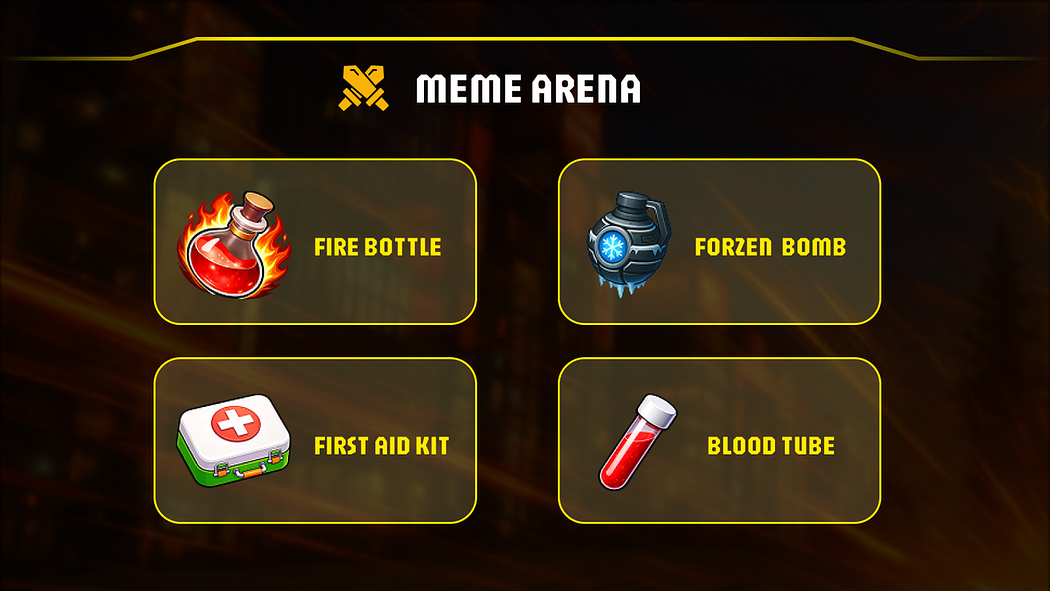
During battles, players may encounter different items that can influence the outcome.
Common items include:
Using these items strategically can provide an advantage during combat.
**Tip:** Defeated players drop **20% of their current score as coins**, as well as the **items in their inventory**.
### Victory Conditions
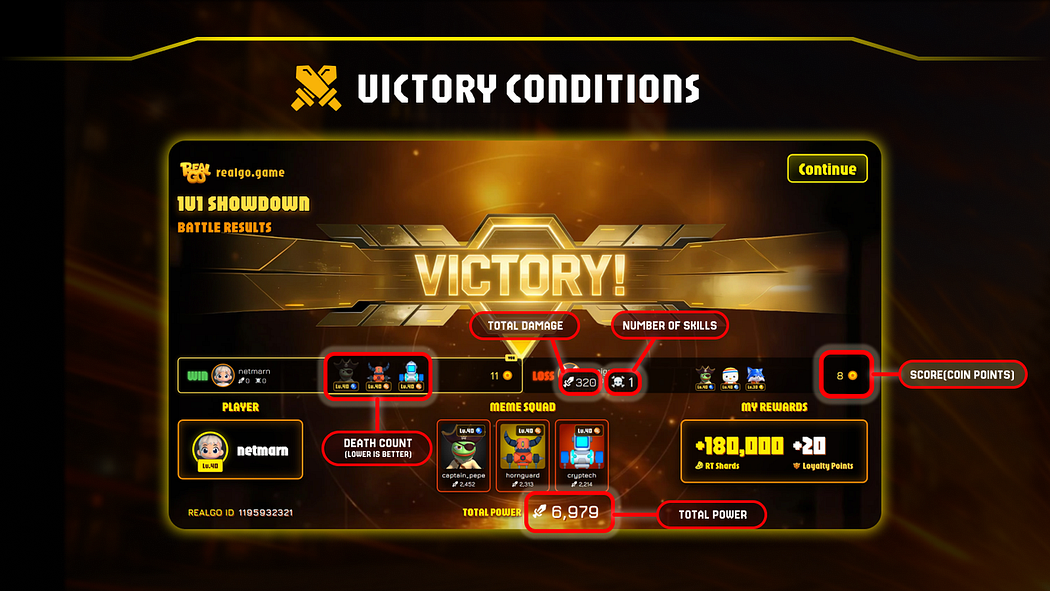
The winner of a match is determined using the following priority:
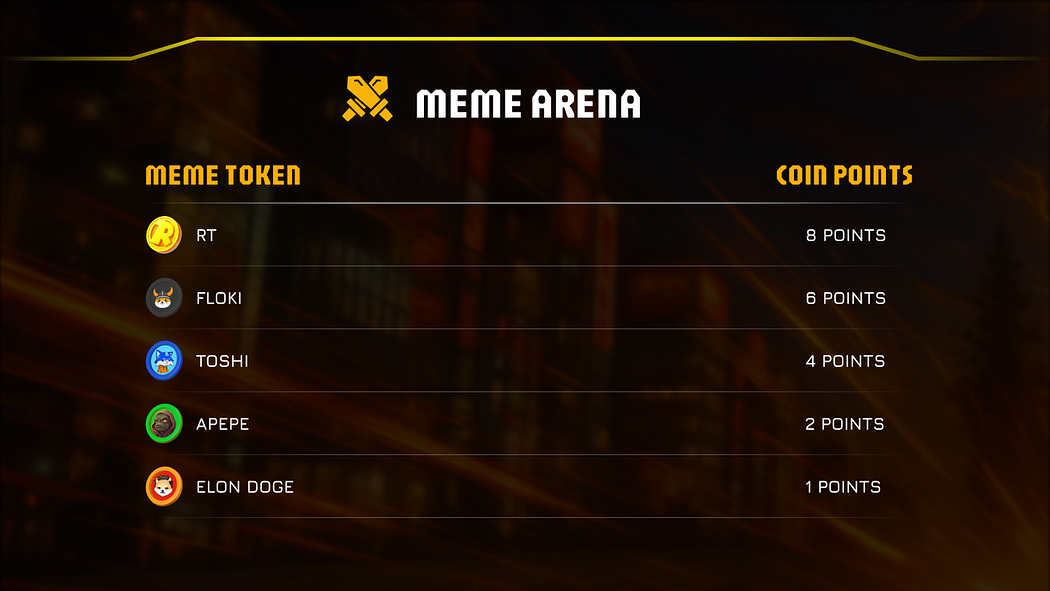
1. **Score (Coin Points)**
2. **Number of Kills**
3. **Death Count (lower is better)**
4. **Total Damage**
5. **Total Power**
**Condition:** At least one pet must remain alive. If all three pets on one side are eliminated, that player will automatically be considered the **loser**.
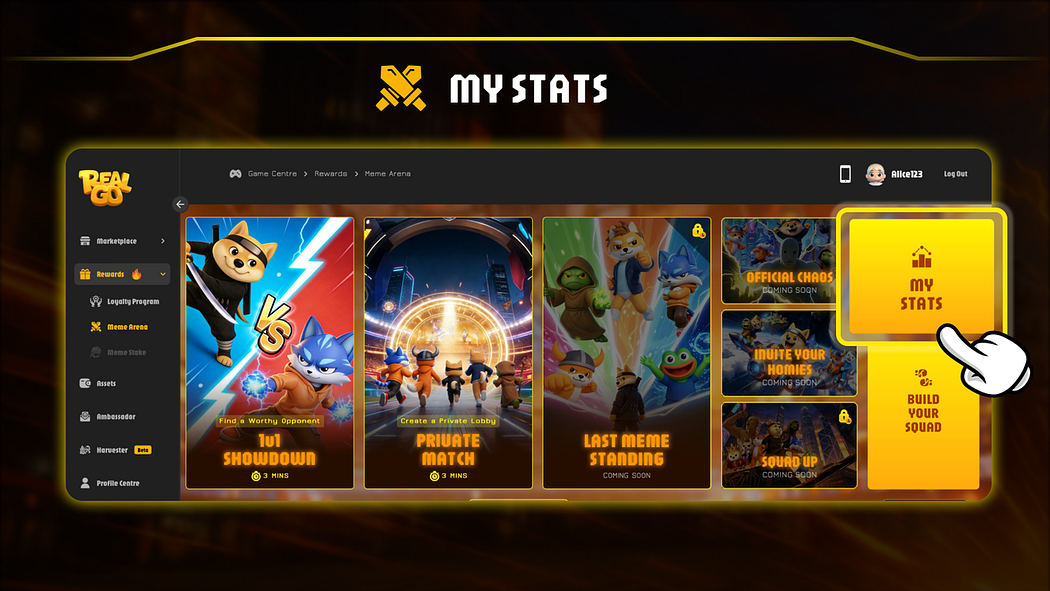
### My Stats
The **My Stats** section provides an overview of your activity and performance in Meme Arena.
It contains two key sections:
* **Match History**
* **My Rewards**
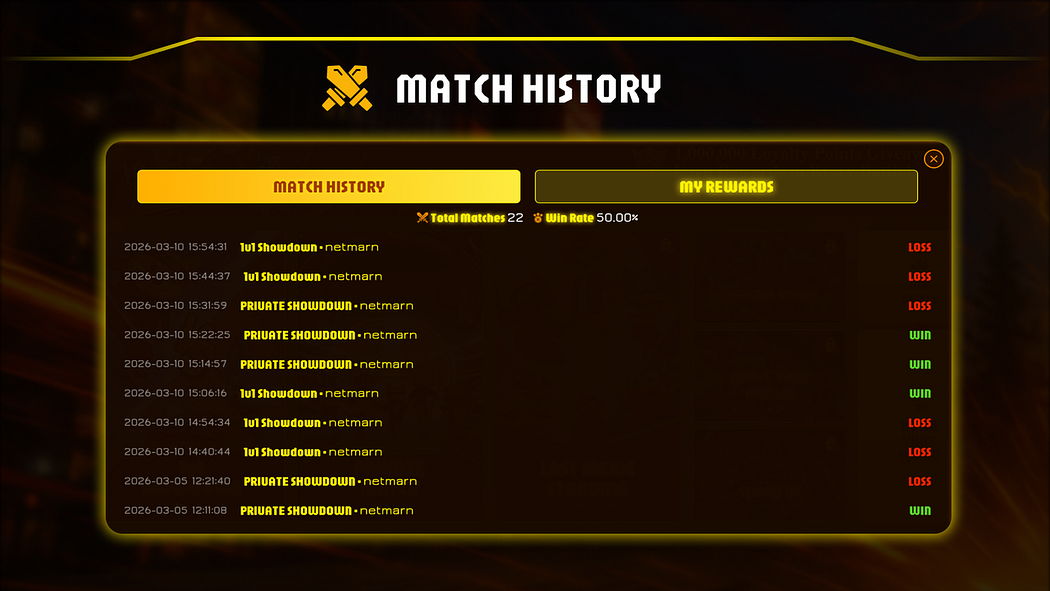
#### Match History
The Match History panel records your battle activity, including:
* Total matches played
* Win rate
* Detailed records of previous battles
This allows you to review past matches and analyse your performance.
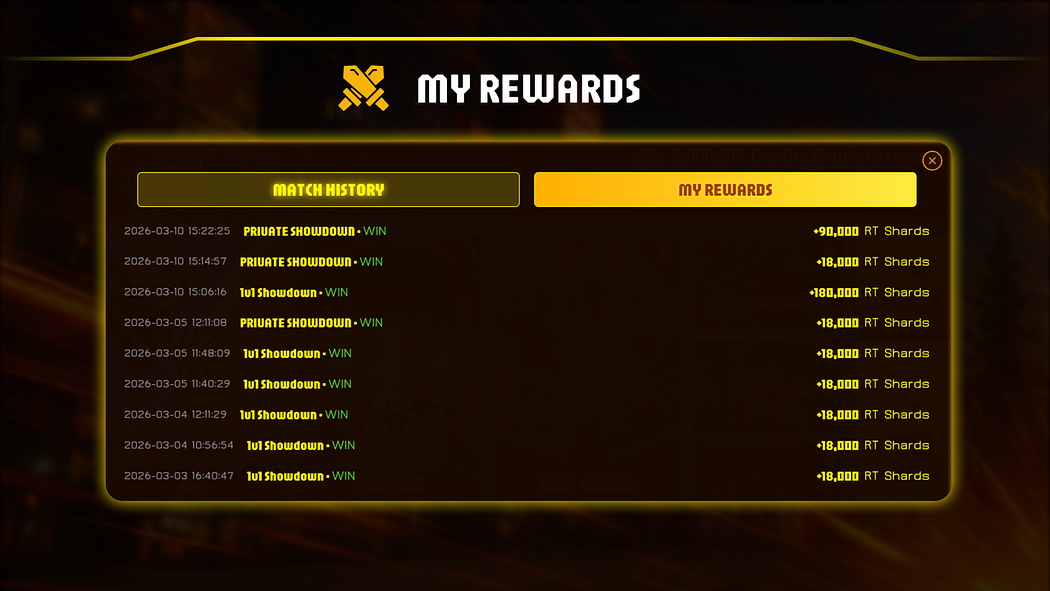
#### My Rewards
The My Rewards panel records the rewards you receive from arena battles.
This section shows the reward settlements from matches you have won and provides a clear overview of your earnings.
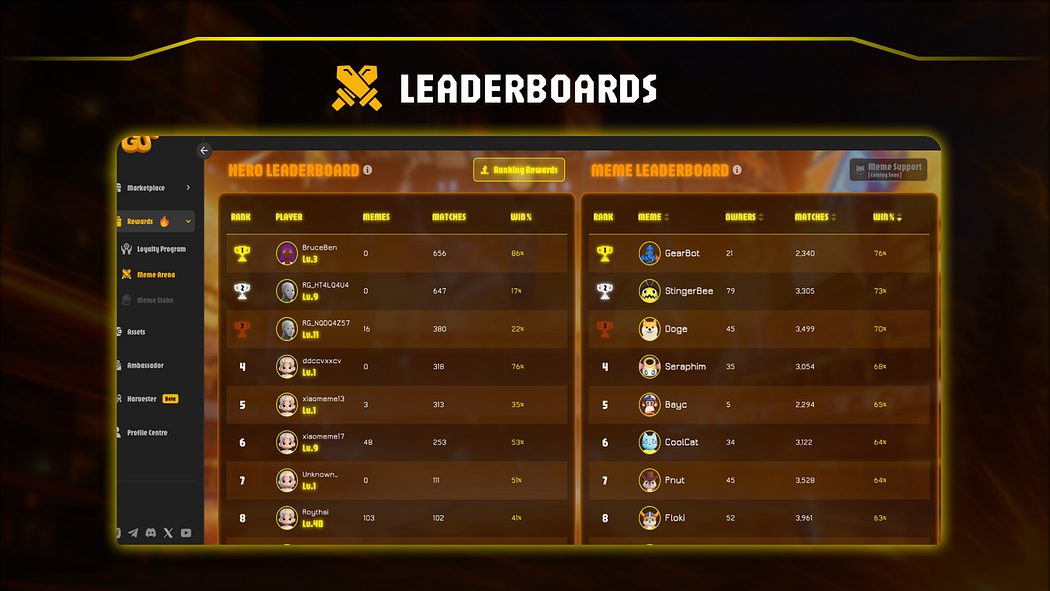
### Leaderboards
Meme Arena features two leaderboards that track performance across the arena:
* **Hero Leaderboard**
* **Meme Leaderboard**
These rankings are based on global battle data and are updated regularly.
#### Hero Leaderboard
The Hero Leaderboard ranks players based on their overall battle performance.
Update Frequency: **Every 4 hours**
Ranking factors include:
* Win rate
* Battle frequency
Players who maintain strong performance across these metrics will rank higher.
#### Ranking Rewards
Leaderboard rewards are distributed **every 24 hours**.
Players who rank within the **top 20%** of the Hero Leaderboard receive **Loyalty Points**.
Reward amounts may vary depending on:
* Ranking position
* Battle performance within the past 24 hours
#### Meme Leaderboard
The Meme Leaderboard tracks the performance of individual memes participating in arena battles.
Update Frequency: **Every 4 hours**
Ranking factors include:
* Win rate
* Battle participation
This leaderboard highlights memes that consistently perform well in arena battles.
### Mobile Browser Mode – Meme Arena Notes
The core gameplay and controls are generally the same as on PC.However, there are a few important differences when playing on mobile:
#### Enable Landscape Mode
Please make sure your phone’s screen rotation is unlocked and switch to landscape mode before playing.As shown in the image:
* If rotation is locked in your system settings, please unlock it first
* The game is best experienced in landscape mode
#### Item Usage Control
Items are used based on their current order:
* The **first item on the list is the one that will be used by default**
* If you want to change which item is used, you need to manually adjust the order
Example:
If you want to use the second item (e.g. Frozen Bomb):
1. Tap the Frozen Bomb
2. Then tap the first item (e.g. First Aid Kit)
3. The Frozen Bomb will move to first position and become usable
Tip:Plan your item order in advance and arrange your preferred skills before entering battle
#### Attack Controls
To aim and use attacks:
* Use your finger to **press and rotate** the corresponding button to adjust the attack direction
* For Q and E skills, you need to **press and hold until the attack is successfully released**
Controls:
* Space — Basic Attack
* Q — Medium Attack
* E — Heavy Attack
4. #### Movement Control
To move your pet:
* Use the **virtual joystick in the bottom-left corner**
* Control movement in all directions (up, down, left, right)
By understanding these mobile-specific controls, you can play Meme Arena more smoothly and improve your performance in battle.
#### Play via PWA (Add to Home Screen)
You can also use PWA by adding the Meme Arena webpage to your phone’s home screen for quick access.
Step 1: Tap the menu button in your browser
Step 2: Select “Add to Home Screen”
Once added, you will see the game icon on your home screen and can launch it directly anytime.
### Battle Tips
1. Upgrade your pets to strengthen your combat power.
2. Use pet attribute advantages to counter your opponents.
3. Practice frequently to master movement and combat controls.
4. Increase your player level to enhance your battle performance.
5. Participate in more arena battles to improve your leaderboard ranking.
Follow us for the latest updates, pro tips, and global events. Meet new friends, form your dream team, and conquer the Meme world together!
Twitter :
Telegram:
Discord :
Tiktok :
Youtube :
Instagram :
Facebook:
Website:[https://www.realgo.game](https://www.realgo.game/)
White Paper:
github:[GitHub — RealGoOfficial/Info: Immersive AR + AI + Web3 game built on location-based gameplay, where ](https://github.com/RealGoOfficial/Info)
### Download:
iOS:
Android:
[ ](https://medium.com/@RealGoOfficial?source=post_page---post_author_info--89e41edf4e5f---------------------------------------)